Shapes
Overview
The Shapes section defines the position pattern that will be generated. There are 12 base shapes and a number of parameters to control how the shape is applied to your fixtures.
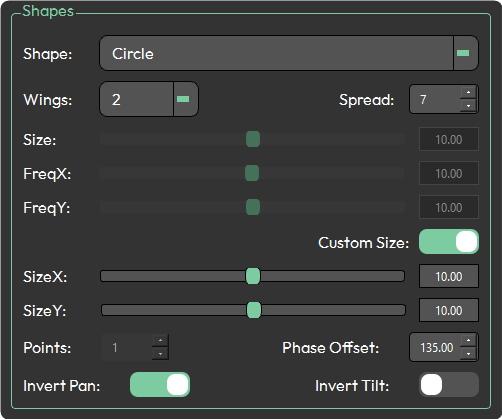
Available shapes
- Circle
- Oval
- Figure Eight
- Lissajous
- Square
- Triangle
- Spiral
- Wave
- Star
- Pan Scissors
- Tilt Scissors
- Fan
Parameters
Shape
The foundation of the generated pattern. Select one of the 12 shapes above.
Wings
Controls symmetrical mirroring of the shape across the fixture group.
| Value | Result |
|---|---|
| 0 | No symmetry |
| 2 | Split in half — one side mirrors the other |
| 4 | Four sections with mirroring |
| 8 | Eight mirrored sections |
| 16 | Sixteen mirrored sections |
Spread
Determines how fixtures are distributed across the shape's steps. If the spread value is lower than the fixture count, fixtures will wrap around and repeat steps.
With a spread of 12 and 16 fixtures, fixtures 1–12 occupy steps 1–12, then fixture 13 returns to step 1.
Size
Maximum percentage offset from the referenced palette, applied equally to both pan and tilt.
FreqX / FreqY
Frequency multipliers for the horizontal (FreqX) and vertical (FreqY) axes. A lower value produces a wider, gentler curve; a higher value produces tighter, more compressed curves.
Custom Size Toggle
Disables the Size slider and enables independent SizeX and SizeY controls.
- SizeX — maximum horizontal percentage offset from the referenced palette
- SizeY — maximum vertical percentage offset from the referenced palette
Points
Sets the number of points on the shape. Available with the Star shape only. Minimum value is 1.
Phase Offset
Rotates where the first fixture sits on the shape, from 0 to 360 degrees. At 0°, the first fixture is positioned at 12 o'clock — increasing the value rotates this clockwise.
| Value | Position |
|---|---|
| 0° | 12 o'clock |
| 45° | ~1:30 |
| 90° | 3 o'clock |
| 180° | 6 o'clock |
| 270° | 9 o'clock |
Invert Pan / Invert Tilt
Inverts the pan or tilt values of the generated shape independently.