Position Generator
Overview
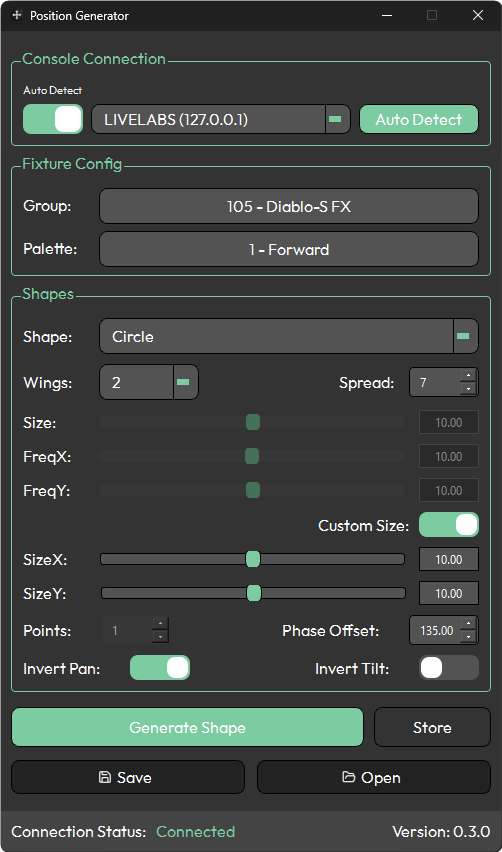
Position Generator is a tool for creating and storing position data on Avolites Titan consoles. The application consists of three main sections — Console Connection, Fixture Config, and Shapes — along with four action buttons: Generate Shape, Store, Save, and Open. A status bar at the bottom of the interface displays the current connection state.
Position Generator creates positions relative to a selected position palette. This means that by referencing a base palette (such as your "Forward" or "Home" position), updating your show for different venues becomes straightforward — simply update the reference palette on the console and regenerate the positions with Position Generator. Recalling your configuration is easy, as Position Generator allows you to save and open presets.
See Creating Groups and Layouts for guidance on setting up groups and layouts in Titan for use with Livelabs Creative products.
If you have an MVR file of your rig, the MVR Fixture Importer can generate group layouts based on 3D position data — ready to use with Position Generator. Note that this feature is experimental.
Typical workflow
- Create a group and group layout in Titan
- Create your base position palettes on the console (e.g. Forward, Forward Down)
- Connect Position Generator to Titan
- Select your group
- Select your base position palette
- Edit the shape settings
- Generate the shape
- Click Store to open the Store Steps window
- Choose how many steps you want to record
- Select an empty palette slot (or, for multiple steps, a slot with enough free slots after it)
- Set the palette legend
- Press Confirm to complete the store