MTC Config
Overview
The MTC Config section contains all the settings for configuring timecode input and synchronization with Titan.
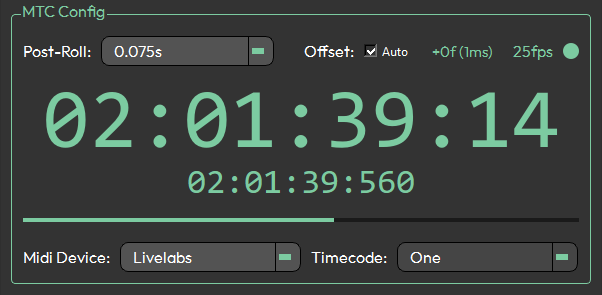
Timecode Settings
Post Roll
Configures the post roll behaviour for timecode playback.
Offset (Network Latency)
Applies a time offset to compensate for network latency between MTC Listener and the Titan console.
This feature is experimental and may not produce consistent results.
Clocks and Display
FPS Detection & MTC Receive Status
Displays the detected frame rate of the incoming timecode and indicates whether MTC is actively being received.
| Status | Meaning |
|---|---|
| Solid green | Receiving and decoding a stable MTC stream |
| Flickering green/orange | MTC stream is unstable |
| Solid orange | No MTC data being received |
Incoming MIDI Timecode
A large timer display showing the current MIDI Time Code being received from the selected MIDI device. The clock turns green when timecode is being received and orange when it is not.
Avolites Timecode
A smaller timer display showing the timecode value currently being received by the Titan console. The clock turns green when timecode is being received and orange when it is not.
Frame Progress Bar
A visual indicator that fills across each second, divided into segments matching the detected frame rate.
Titan
MIDI Device
Selects the MIDI input device from which MTC Listener will receive MIDI Time Code.
There are known MIDI issues on Windows 11. See System Requirements for details and workarounds.
Timecode Clock
Selects the target timecode clock within Titan that will receive the synchronized timecode.
The selected timecode clock must be set to Internal in Titan.