CSV Config
Overview
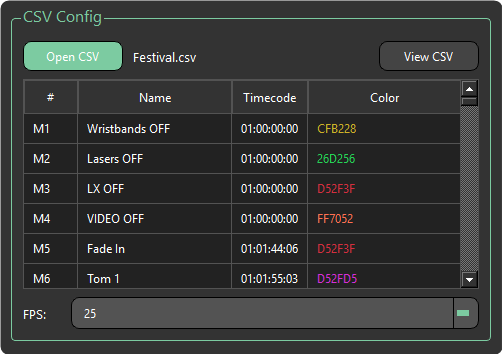
Open CSV File
- Open CSV — Opens a CSV file.
- View CSV — Opens a second window to view the CSV file in detail and edit where desired. See View CSV.
CSV Table
A compact table providing a quick overview of the loaded CSV file. For a more detailed view, use the View CSV button.
| Column | Description |
|---|---|
| # | Cue number |
| Name | Cue name |
| Timecode | Cue timecode trigger time |
| Color | Colour of the marker as defined in Cuepoints or Reaper |
Info
Only the Name and Timecode columns can be edited.
FPS
- FPS — By default this will detect the frame rate used by the cues, but can be changed manually if required.
warning
Setting the wrong FPS can cause undesirable results.